![didomi-logo-dark.svg]](https://support.didomi.io/hubfs/website-2023/assets/logos/didomi-logo-dark.svg)
If you need to store your consent notice here are the steps you need to follow :
Delete your targets domains and unselect the Default notice option
- Go to your consent notice.
- Go to the last step called 3.Publish
- Delete the domains on the Add target domains and click on Publish section.
- Unselect "Declare the notice as the default notice" (See below)
- Click on Publish (red button)
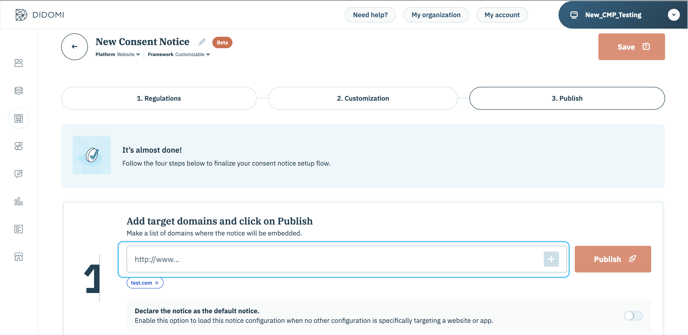
- Don't forget to SAVE & PUBLISH for the updates to be taken into account.
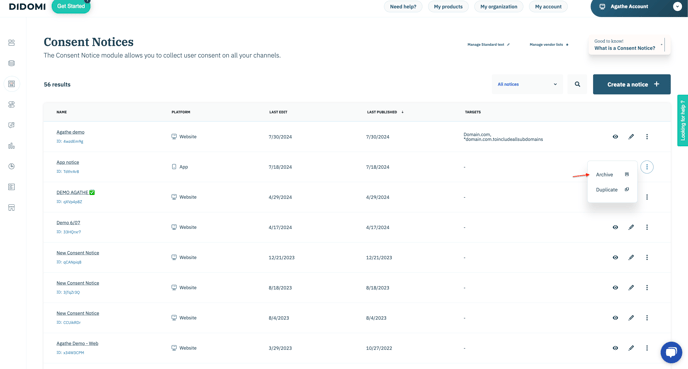
Archive your notice
- Go to Consent Notices.
- Click on the button allowing you to archive a notice.
Find your Archived Consent Notice
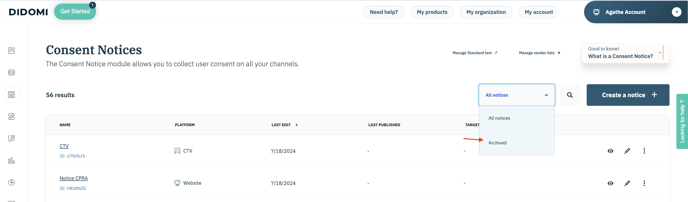
To find your archived Consent Notice:
- In the Consent Notices Section, at the top right of the screen, select Archived Notices.