![didomi-logo-dark.svg]](https://support.didomi.io/hubfs/website-2023/assets/logos/didomi-logo-dark.svg)
Create a preference into your Configuration Tree
- Go on the Configuration Tree tab.
- Go to the Preferences Library section on the left.
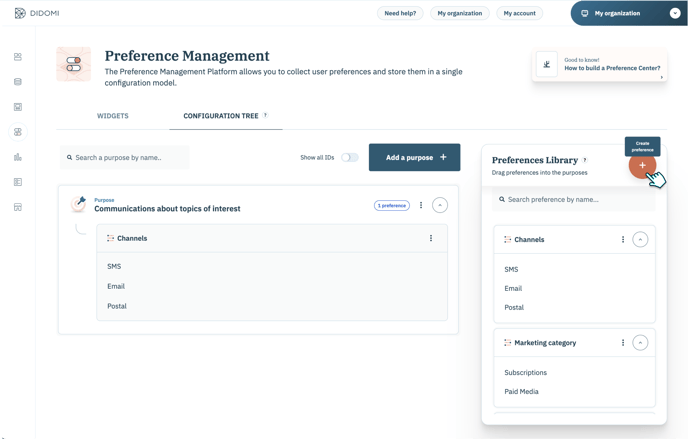
- Click on the + (Create a preference).
👉 A new window opens, allowing you to create your new preference and potential translations if needed, and to fill in some blanks:
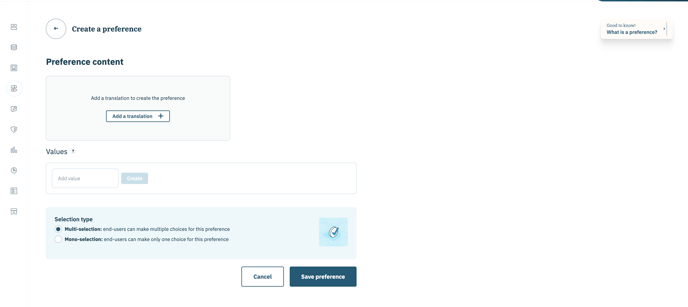
- Preference name (mandatory)
- Description (optional)
- Values (mandatory): create the checkboxes you need related to your preference
- Selection type (mandatory): choose between multi-selection and mono-selection
You need to define at least one language.
- Click on Save preference.
- You can now find your preference in the Preferences Library section.
- You can drag your preference and drop it into the purpose you want.
Edit a preference into your Configuration Tree
- Head to the Configuration Tree tab.
- Go to the Preferences Library section on the left.
- Click on the three dots near the preference you want to edit.
- Click on Edit. In this small menu, you can also Delete (link to the support page) and Duplicate your preference.
- Click on Save preference.